CSAA ·Product Design Lead ·Team: +0 ·Time: 2018 ·UX,UI,Visual Design
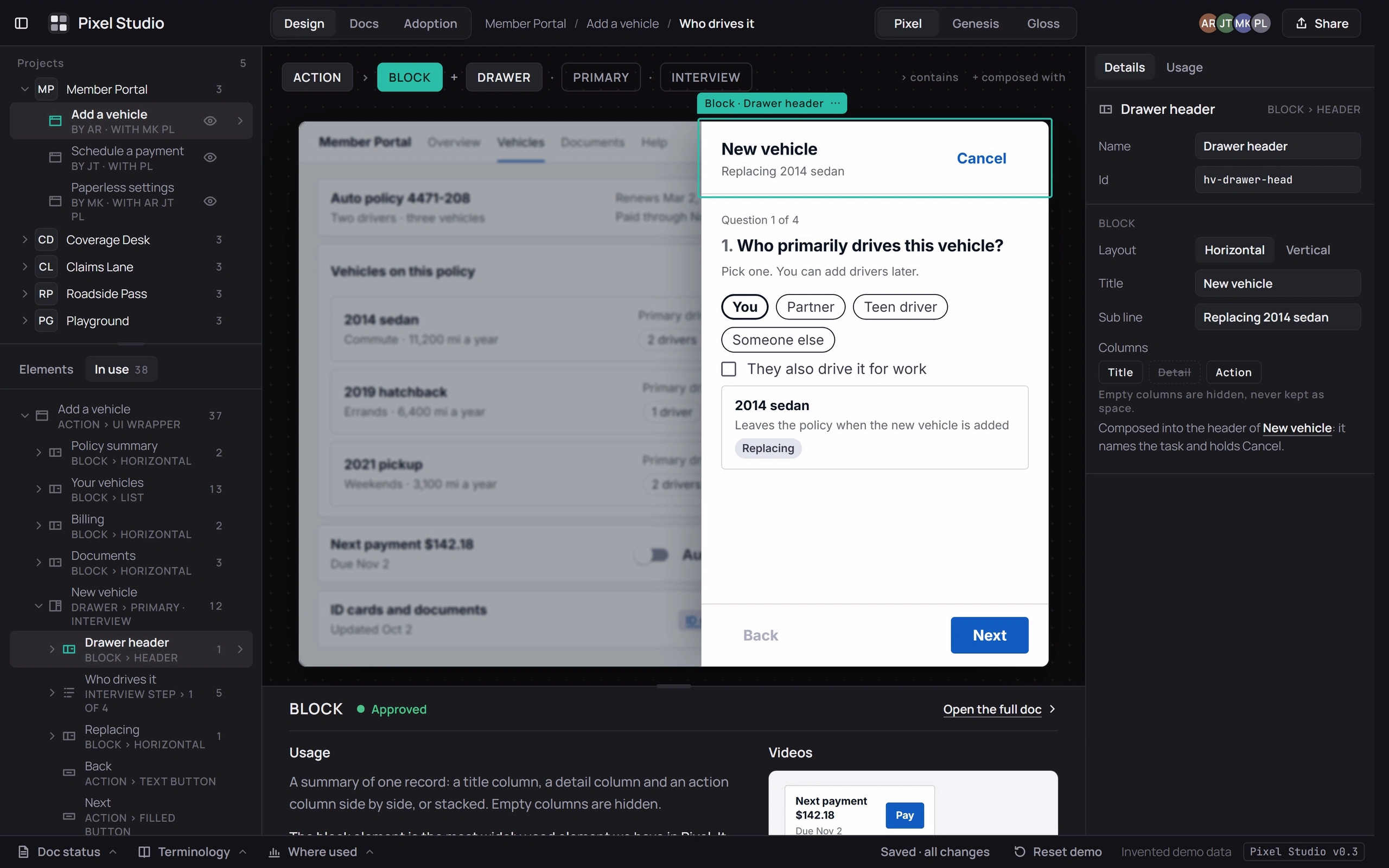
A studio for the Pixel design system: a projects list with each project’s flows and collaborators, an element library grouped by purpose (buttons to take action, navigation to find your way, forms to enter data), and an In-use tree of each screen down to its fields, with a usage panel giving each element’s purpose, tags and review status. Its side panels are also on the Creator UIsThree creator toolsThree creation tools you can try: a design-system studio, a custom print designer and a page builder, with their side panels.Application page.
It runs on five invented projects and opens on a member portal’s “Add a vehicle” interview drawer, with the drawer’s header block selected and the Block doc open under the canvas. Drag an element from the library into the screen and drop zones open in place. Click anything on the canvas and the In-use tree, the chips naming its containers and the inspector all follow it. Change its kind, size or state, or switch the screen between Pixel, Genesis and Gloss: anything a system lacks is flagged in words and drawn as its nearest equivalent.
Usage docs can be edited and moved from draft to review to approved, with a stamp. “View all states in State Maps” opens State MapsState mapsEvery variant, size and state of seven components in three design systems you can switch between, with nine maps from two of them below.Application at that element, system and state. Adoption counts where each element is used across the five projects, and clicking a count opens that screen with those instances selected.
Wireframes
How Pixel Studio works, sketched: compose, check and document, its two main views, one choice about where docs live, and two states.
1Compose, check, document. Composing a screen and documenting what it uses, in one place.2The studio. The studio: library and tree at left, the screen, its doc beneath.3Adoption. Adoption: where each element is used, and where it drifted.4Where the docs live. Docs beside the work instead of in another tab.5Not in this system. Switching systems when one lacks an element.6A combination that can’t exist. An option the current system can’t build.