Intel · Product Design Lead · Team: +1 · Time: 1 Year (2014) · UX, UI, Front-end
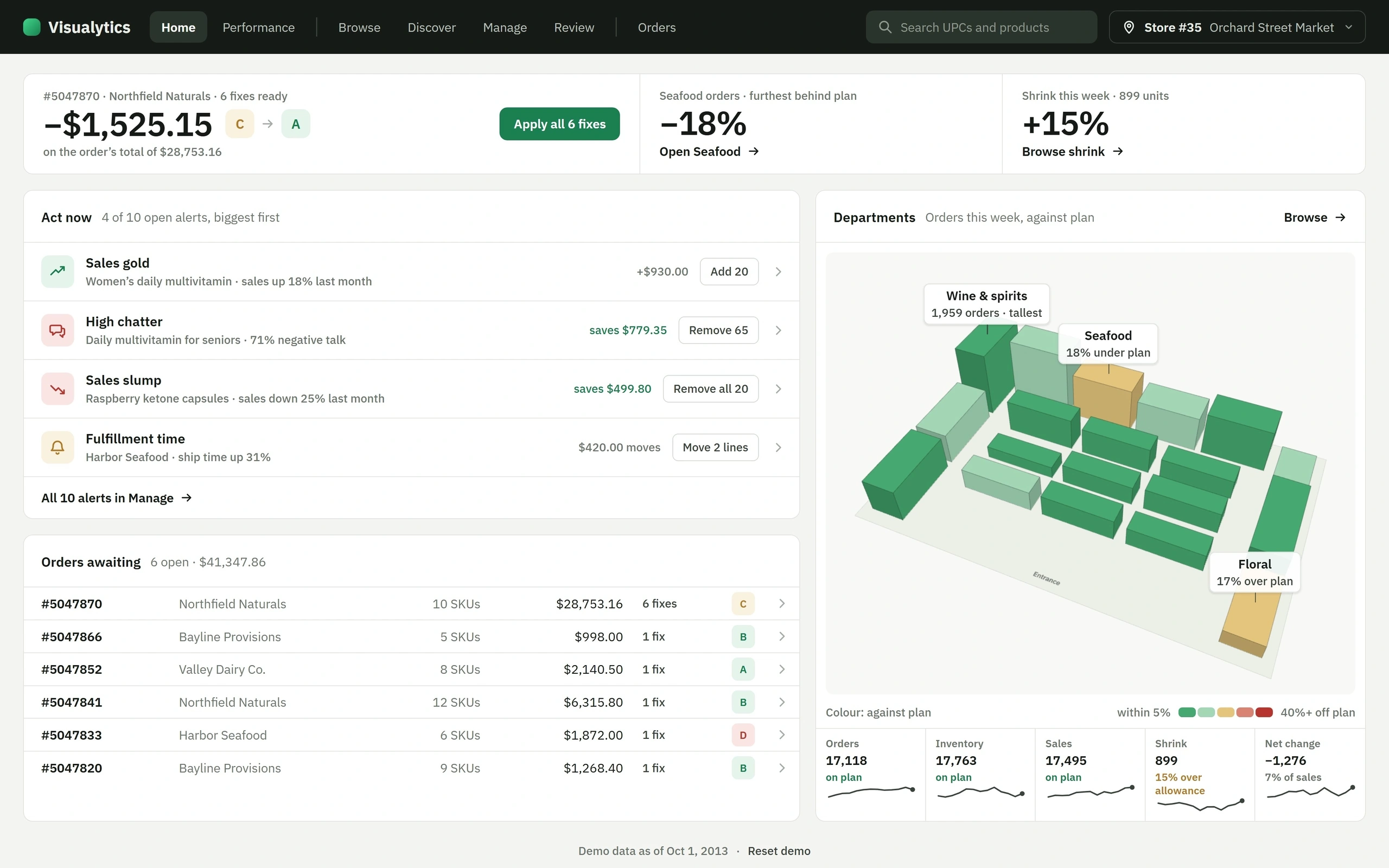
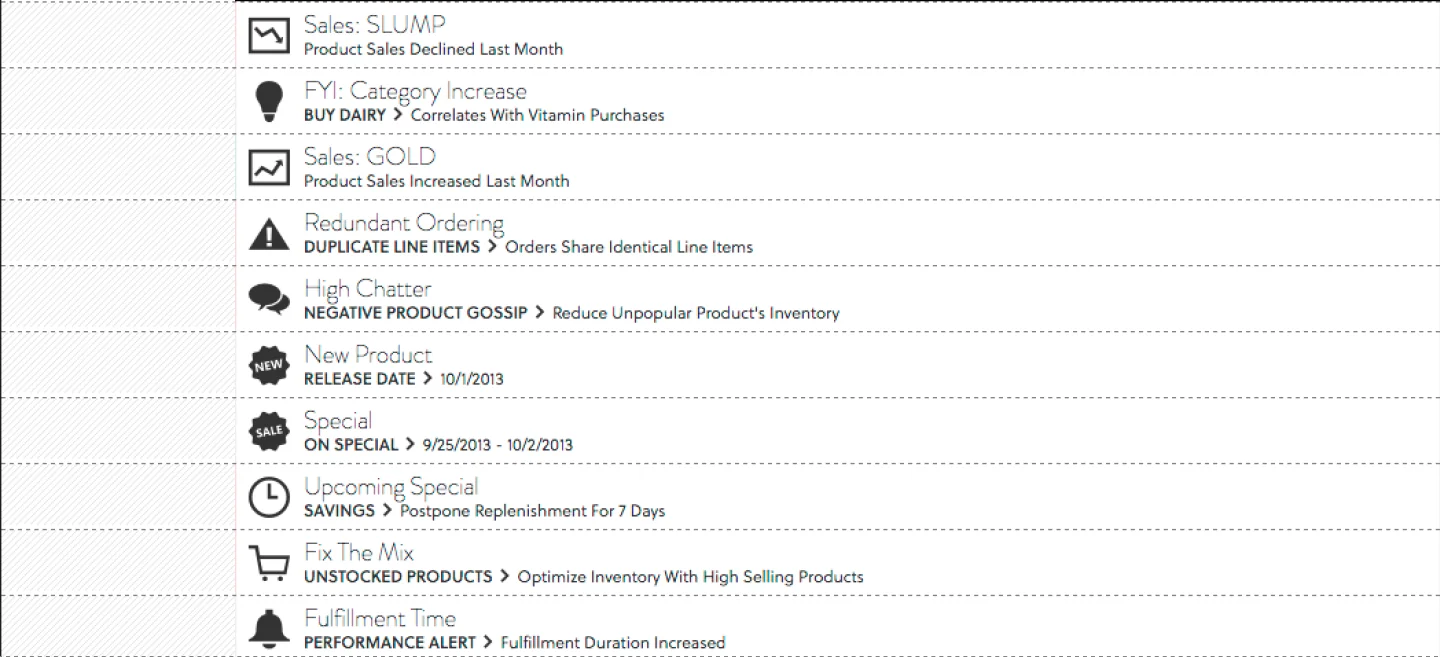
A desktop retail-intelligence app: an alert feed that pairs each insight with an action, a dated deals timeline, dense order rows with grades, quantities and suggested fixes, and a 3D product browser that drills from a store into departments and categories. Above is a live app: every alert carries its fix, orders regrade as you apply them, and Browse is the 3D store again, from the floor plan down to a shelf. Performance tracks the store over 13 weeks and Review grades the orders you placed.
Wireframes
How Visualytics works, sketched: from an insight to an order, its three main screens, one choice about alerts, and what applying a fix does.
Insight to order A flow of six steps: an alert, the product detail, apply the fix, the order line changes, the order grade moves, and place the order, with a dashed Undo branch from apply back to the alert. Insight to order Every insight ends in a change to the order. Alert Product detail Apply the fix Undo Order line changes Order grade moves Place the order The order grade One order line C A 210 145 1 Every insight ends in a verb The path never stops at a chart; it ends in a change to the order. 2 Reversible Any applied fix can be undone before the order is placed. 1 Insight to order. From an alert to a placed order.Manage A wireframe of the Manage screen: a top nav (Home, Browse, Discover, Manage, Orders) with a store chip, a feed of alert rows each ending in a verb and number, one row selected, and beside it a product with a sales trend card, a chatter card, the reason and an Apply button. Manage The alert feed on the left, the product it is about on the right. Visualytics Home Browse Discover Manage Orders Store #35 Alerts High chatter Sales gold Add 20 +$930.00 Sales slump Chatter High chatter saves $779.35 Remove 65 Sales slump Remove 20 saves $499.80 Fulfillment time $420.00 moves Move 2 lines saves $779.35 Redundant ordering saves $89.50 Remove 50 Dismiss Apply 1 Every alert carries its action Each row ends in a verb and a number. 2 The reason beside it Why, and what it saves, sit next to the action. 3 Selection without a stripe The selected row is filled, never marked by a coloured left bar. 2 Manage. Manage: each alert paired with the action it suggests.An order with its fixes A wireframe of an order: a header with the order number, supplier, total and a grade letter in a circle, ten line rows with a quantity and a fix chip on some, and Apply all fixes and Place order buttons. An order with its fixes Each suggested change sits on the line it changes. Visualytics Home Browse Discover Manage Orders Total $28,753.16 grade C Item Qty Unit Suggested fix 50 Remove 50 80 38 44 112 170 Remove 30 20 Remove 20 210 Remove 65 259 Add 20 250 Lower to 230 Apply all fixes Place order 1 Fixes where the quantity is Each suggested change sits on its own line, not in a separate list. 2 A grade for the order The grade moves as fixes apply, so their effect is visible. 3 An order with its fixes. An order with its fixes inline and a grade that responds.What an alert is Two options side by side: an alert with a chart and a headline only, struck through, and an alert with its verb, quantity and saving, circled as the choice. What does an alert show? Sales slump Sales slump saves $499.80 Remove all 20 the reason, one line A chart and a headline The action, quantity and saving An insight nobody acts on is noise; the action makes it a decision. 4 What an alert is. Alerts that carry their action.A fix applied The order after one fix: a confirmation bar reading Removed 65 with Undo, the Alerts count one lower and the cart count one higher, a lower total, and a line quantity of 210 struck through and replaced by 145. A fix applied state: after Apply One click, and everything that depends on it follows. Visualytics Alerts 9 In cart 1 Removed 65 · Undo Total $27,973.81 was $28,753.16 50 80 38 44 210 145 Remove 65 112 170 20 259 250 1 Say what changed The confirmation names the change and offers Undo. 2 Every count follows Alerts, cart and the order total update together. 5 A fix applied. What applying one fix changes.Browse by place A wireframe of Browse: an isometric store of department blocks with one department drawn bold, beside a column of its categories and a column of the items in one category, under a breadcrumb from the store to a department to a category, with a row of figures below. Browse by place The store opens into departments, then categories, then items. Visualytics Home Browse Discover Manage Orders Store #35 Store / Seafood / Shrimp & prawns Categories Items Lobster & crab Shrimp & prawns 96 47 Oysters & mussels 32 Frozen 28 Seafood Fish Smoked & cured fish 24 21 Store 20 Colour: against plan Orders Inventory Sales Shrink Net change 1 Drill by place The store opens into departments, then categories, then items, with a breadcrumb back. 2 Moves, not cuts Each level zooms from the one before, so you always know where you came from. 6 Browse by place. Browsing from the store down to an item.Mockups
Its 8 mockups, in order:
Visualytics ActionBI
Discover Deals
Compact UIs of Actionable BI
Compact UIs of Actionable BI
Compact UIs of Actionable BI
Three Dimensional Product Browsing
Three Dimensional Product Browsing
Three Dimensional Product Browsing