Barrett-Jackson · Product Designer · Team: +0 · Time: 1 Month (2016) · UI, Visual Design
Named in the résumé under Other Work at Mindnest .
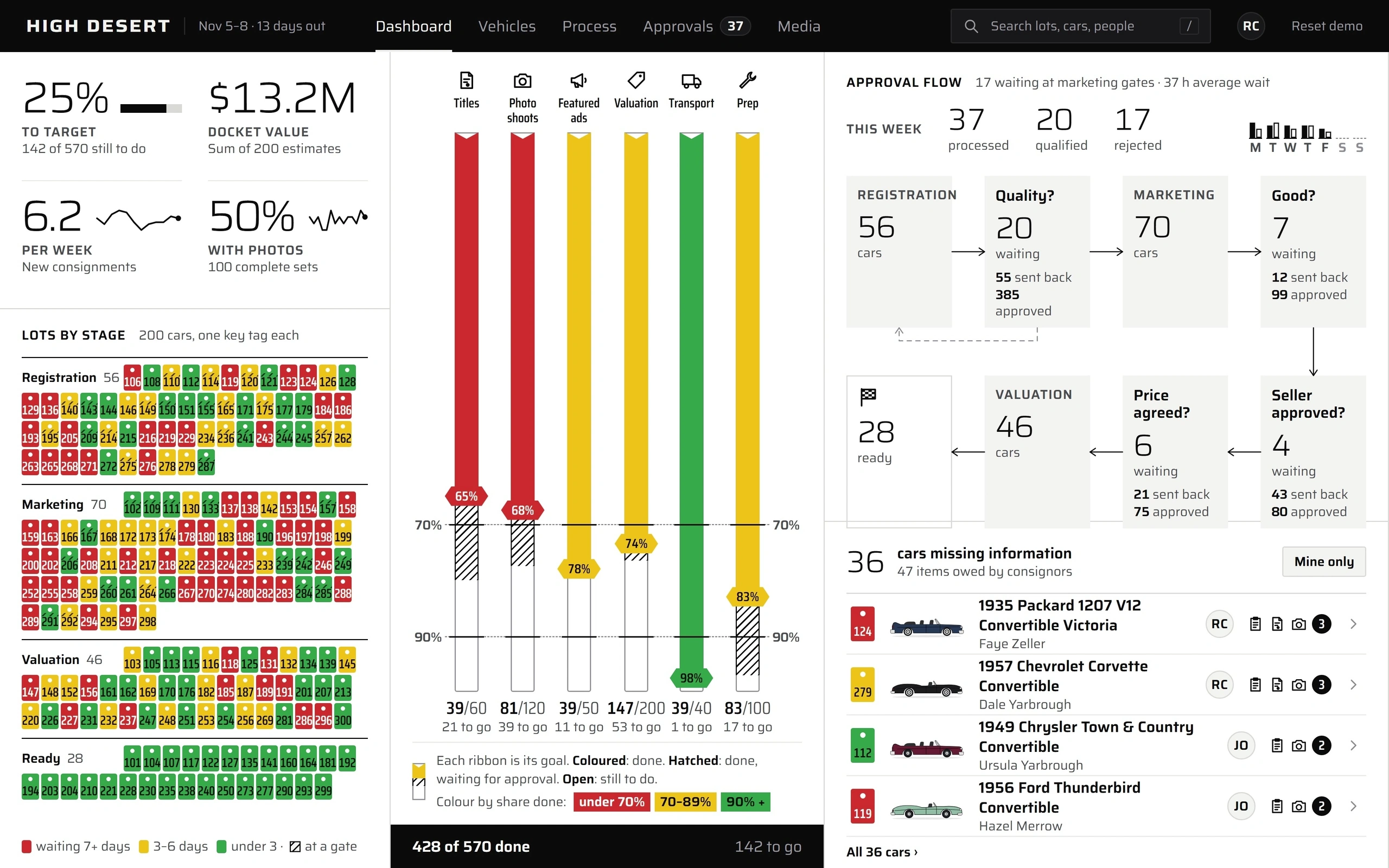
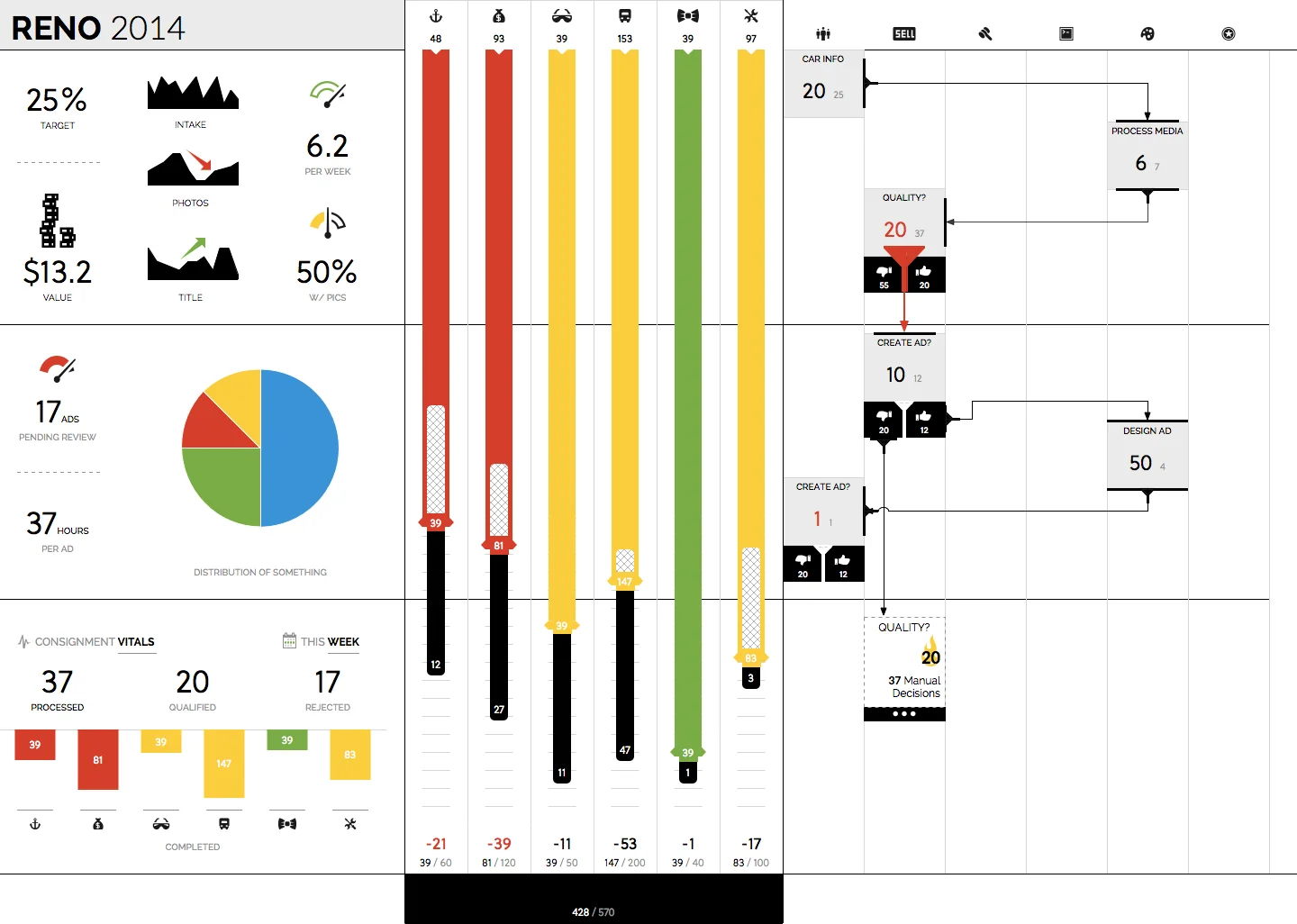
Screens for managing consigned cars: a dashboard with KPI tiles and sparklines, six progress ribbons tracking counts against goals, an approval flow, a popout listing cars missing information, a dark media library, and an actionable process diagram that runs from registration through marketing to valuation. Above is a live app on invented data: approve or send back a car at any gate and every count, ribbon and the process diagram follow it.
Wireframes
How Auction Manager works, sketched: a car's path, the two screens that run it, one choice about the ribbons, and the state that matters most.
A car's path A flow from Consigned to Registration, Marketing, Valuation and Ready, with a yes-or-no gate after Registration and three gates inside Marketing, dashed rejected loops from each gate back to its step, and two side tasks, with New photos off Registration and Generate ad off Marketing. A car's path From consignment to sale, with a question to answer at every hand-off. Consigned Registration Marketing Valuation Ready rejected Quality? Good? rejected New photos Seller rejected Generate ad approved? Price agreed? rejected solid: the way forward. dashed: a car sent back. 1 Gates are questions Each step ends in a yes or no a person answers, so a stall has a name. 2 Rejects loop back A rejected car returns to the step that fixes it, and every count follows. 1 A car's path. A consigned car's path, with the questions that hold it up.Dashboard A wireframe of the dashboard: four tiles with small trend lines, six tall progress ribbons showing done against goal with threshold lines and a legend, and a bottom strip with processed, qualified and rejected counts and how many are waiting at the marketing gates with the average wait. Dashboard Where the work stands against its goals. High Desert Dashboard Vehicles Process Approvals Media To target new consignments Docket value sum of estimates Titles Photo shoots Featured ads Valuation Transport Prep 70% Per week new consignments With photos complete sets 90% 39/60 81/120 39/50 147/200 39/40 83/100 Coloured: done. Hatched: done, waiting for approval. Open: still to do. under 70% 70–89% 90% + This week processed qualified rejected 6 waiting at marketing gates · 37 h average wait 1 Counts against goals Six ribbons show done against goal, not just totals. 2 Three thresholds Under 70% of goal, 70–89%, and 90% or more: each colour means one distance. 3 One action, every number Approving a car moves its ribbon, the KPIs and the diagram together. 2 Dashboard. The dashboard: every count shown against its goal.The process as a control A wireframe of the process screen: a snaking diagram of steps and gates with counts under each, the Quality gate selected, and a side drawer listing the cars waiting there, each with Approve and Reject buttons. The process as a control The diagram is also where the work gets done. Process Quality? 20 waiting Registration Quality? Marketing Good? Approve Reject 56 cars 70 cars 20 waiting 218 edits 7 waiting 12 edits Approve Reject Seller Price Valuation Ready approved? agreed? 46 cars ready 4 waiting 6 waiting Approve Reject 24 edits 56 edits Approve Reject 1 Click a step The diagram opens the cars waiting at that step. 2 Act in place Approve or reject from the drawer; the gate counts change as you do. 3 Edits counted Each gate shows how many edits it took to pass. 3 The process as a control. The process diagram doubles as the way to act on it.Reading the ribbons Two options side by side: ribbons drawn with hatching and notches and no key, struck through; and ribbons coloured by distance to goal with a hatched segment for work waiting on approval and a legend, circled as the choice. How should progress read? 39/60 81/120 39/50 147/200 39/40 83/100 under 70% 70–89% 90% + Coloured: done. Hatched: done, waiting for approval. Open: still to do. Hatched and notched, no key Done over goal, every mark in the legend Every mark is explained beside the ribbon: colour for distance to goal, hatching for work waiting on approval. 4 Reading the ribbons. Choosing a ribbon whose every mark is in its legend.Missing information A wireframe of the vehicles list with the Missing info only filter on, rows showing missing-item icons and counts, and an arrow to that car’s own page, which opens from a row, with a missing checklist where one item is ticked and Approve and Reject buttons. Missing information state: missing info only The list narrows to cars that need something; each opens its own page to fix. Vehicles Search Cars missing information Mine only Missing info only 3 Car page 2 1 3 Missing Title Photos 2 Valuation 1 Approve Reject 1 Missing is a filter Turn on Missing info only and the list narrows to cars that need something. 2 Fix it here Resolving an item lowers the car’s badge and the header count at once. 5 Missing information. Finding and fixing cars that are missing information.Mockups
Its 6 mockups, in order:
Consignment Dashboard
Car Info Popout
Progress Ribbons
Vehicle List
Vehicle Details
Actionable Process Diagram