Intrigo ·Direction,design decisions and review ·Team: me and Claude Code ·Time: 26 to 30 October 2026,the repo’s own span of 71 commits ·UX,UI,Front-end
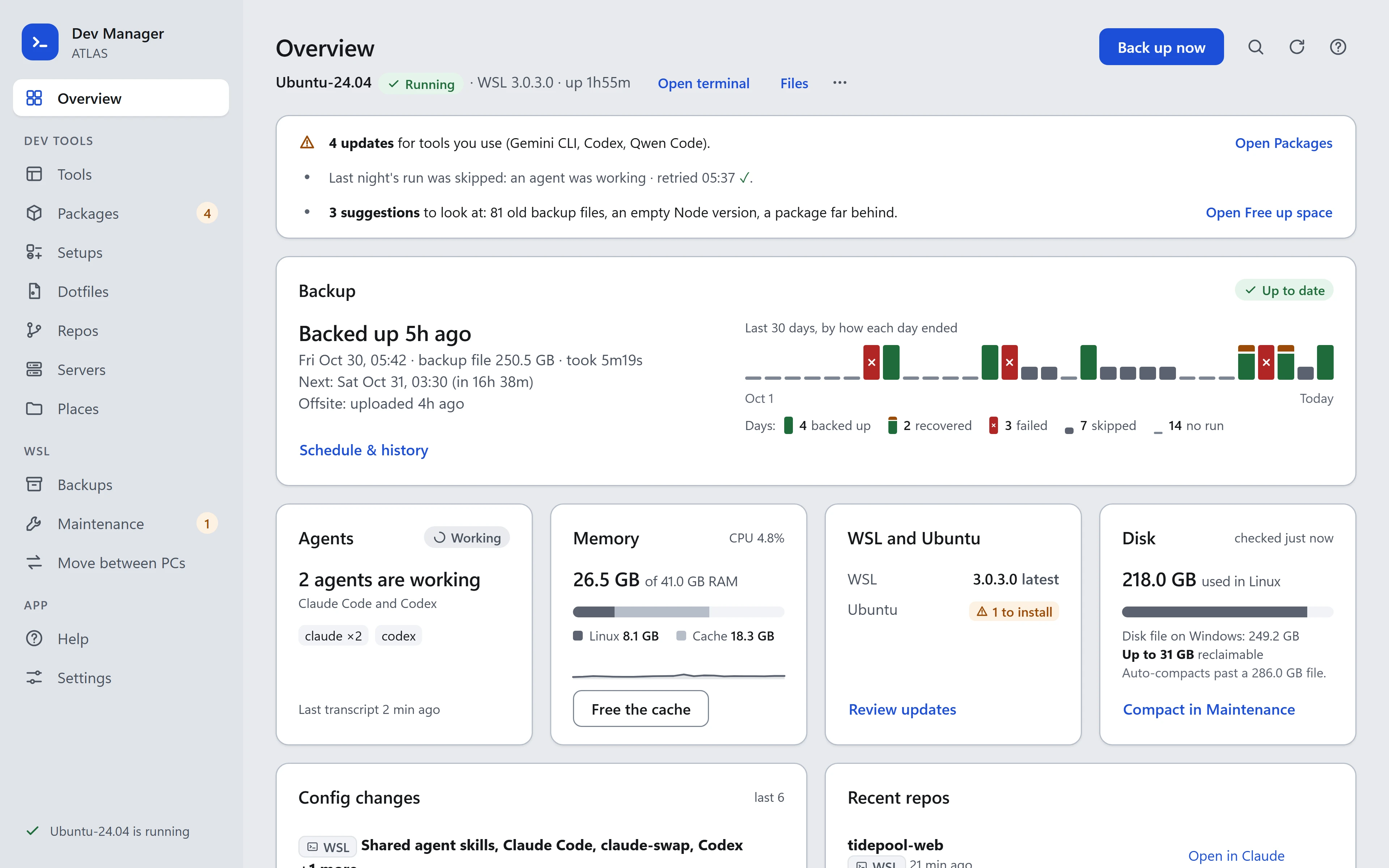
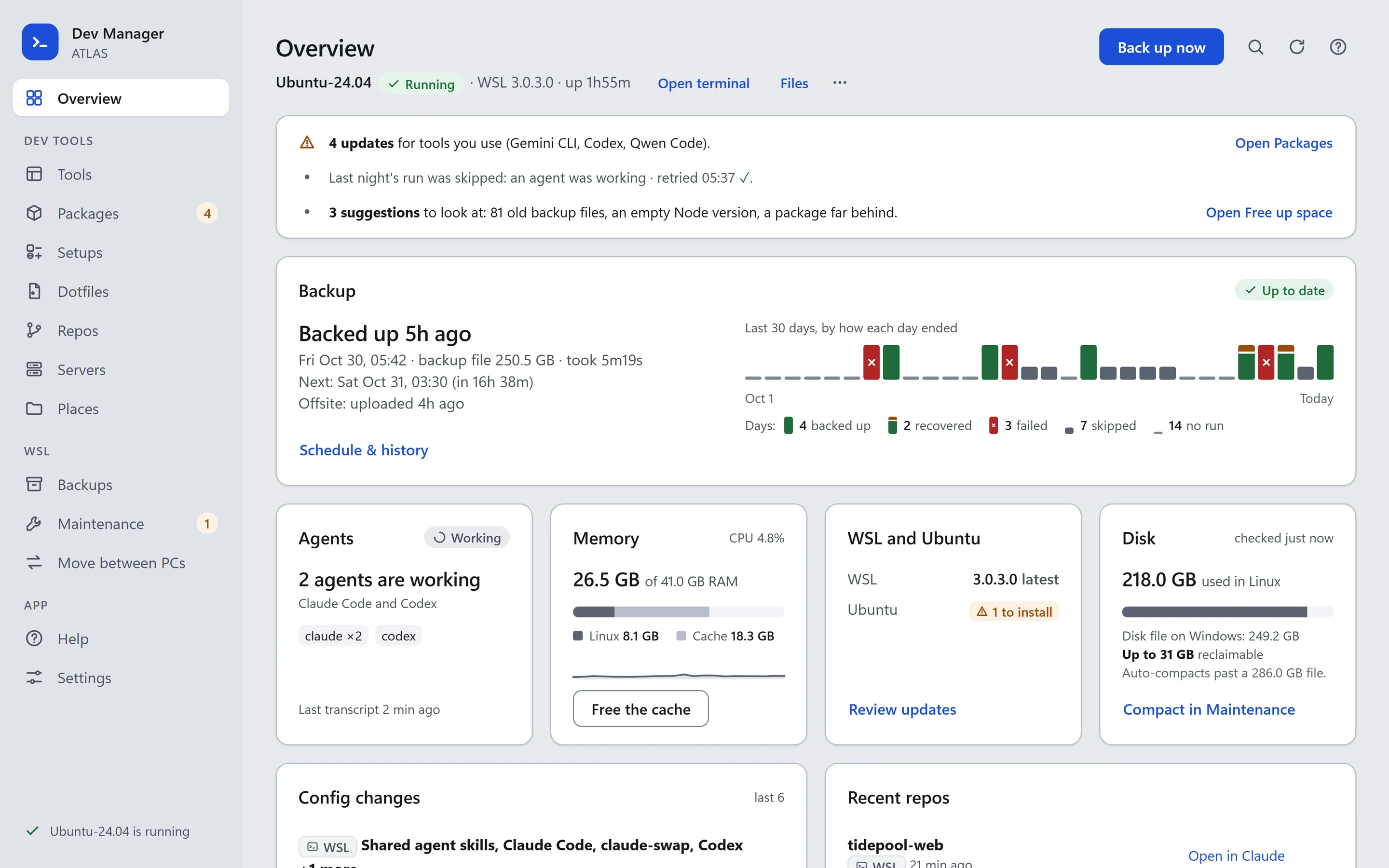
Dev Manager is part of my work at Intrigo, where I build productivity tooling for designing and developing products in the age of AI. My role on it is direction, design decisions and review. It is a Windows desktop app, and the window above is its own page running live, on an invented machine, user, repos and servers, with nothing behind it: buttons that would act on a real PC answer with a note that this is a demo. Numbered notes under the frame move it to the Overview, Backups, Packages and Repos pages. The screens from the working copy follow, and then four before and after pairs from the design rounds. They were captured on 30 October, a little ahead of its last commit.
The code is in a private repo, wsl-scripts. To ask for access, email me at the address in the footer of this page.
What it is
Dev Manager is a Windows tray app for working in WSL. Every night it backs up the WSL disk, waits if an AI agent is still working in it, and every few days sends a compressed, encrypted copy to Google Drive without the Drive app installed. It moves the distro between a desktop and a laptop. It also shows every developer tool, repo, package, config file, dotfile and server on both Windows and WSL in one window, with ways to open, compare, update and put back each one.
Goals
Back up every night without stopping an agent mid-task: a run before 07:00 that finds one working checks again every 5 minutes and backs up once it is idle.
Never start WSL to look at it: the tool probe runs in WSL only while it is already running and no backup or export is using it.
Never show a secret: the probe reads secret files by name only and prints names, counts and hashes instead of values.
Say what an action stops before it runs: every action that interrupts WSL asks in the page, with the agents and servers it stops, counted.
Lead each page with what needs you: up to four findings from the page’s own data, failures first, each with the action that follows.
Fit each page’s default view in 1,800 px at 1440 by 900.
Constraints
Platform. Windows with WSL 2 (Ubuntu 24.04). A C# WinForms host owns all state and actions; the window is an HTML, CSS and JavaScript page in WebView2, with no framework.
Data. Only what is on this PC. A .NET probe built for Windows and for Linux reads 22 tool profiles. Other PCs are seen through the snapshots each one saves to Drive.
Security. Secret-named files are never read. Config history stores contents with secret-looking values replaced. Logs are scrubbed of tokens and passwords. Drive copies and tool bundles are encrypted on this PC before upload.
Size. The WSL disk is around 250 GB on disk; a compressed Drive copy of a 173 GB disk was about 79 GB.
One user. It is built for my own machines. There is no account or sync service.
How it works
Thirteen pages in the sidebar.
Overview. The distro’s state in the head, Back up now at its right. A glance box of findings, then the Backup card across the top with a 30-day strip that shows how each day ended, then four cards: Agents, Memory, WSL and Ubuntu, and Disk, each with one action.
Tools. Every tool the profiles describe, with its version on each side. Opening one lines the two sides up: MCP servers, plugins, hook events, accounts, files and its config history, with “Put back this version”.
Packages. Three tabs: Updates (the tools you use first), Worth a look, and All, one table each, with chips for each package manager: npm per Node version, pipx, uv, cargo, Chocolatey, winget, apt and editor extensions. Updates run as a job that waits while that tool is running.
Setups. A master made from the place you trust, and each other place’s distance from it, item by item: copy the master’s version there, take that place’s into the master, or keep it.
Dotfiles. Config files grouped by name across home folders and repos on both sides, the names whose copies differ first.
Repos. A table per side, the repos that need you first: changes, commits to push, opened from the other side. Opening one shows its git state, recent commits, worktrees, what each agent gets in it, and every way to open it.
Servers. Everything listening on a port on each side: dev servers first, one row per process with its port, folder, memory and start time. A second tab lists the names in the hosts files.
Places. Every file and folder each tool keeps, on both sides: the tools on the left, the picked tool’s files on the right.
Backups. The copy on this PC and the copy in Google Drive side by side, the schedule in one sentence, and Recent activity. A failed run opens into its cause, what ran since, and its own log lines.
Maintenance. Three tabs: Updates, Free up space (each task with what it would free, measured), and Logs.
Move between PCs. Take a copy of any distro, bring one in to replace the main distro (with a safety copy and rollback) or beside it, and compare tool snapshots from other PCs.
Help and Settings. One file holds the terms and a guide for every page; a dotted term shows a short tooltip and opens its guide.
Process
Seventy-one commits over five days, 26 to 30 October 2026, counted with git log --oneline | wc -l; 57 touch the app’s folder. 69 of the 71 carry a Co-Authored-By: Claude trailer. The decisions marked as mine in the design file are mine.
The first day built the product in numbered phases: a backup rework and a WinForms tray app, disk-file backups, a WebView2 window, offsite copies, then Dev Manager’s own phases 1 to 14: the probe, Tools, Repos, Places, config history, bundles, packages, other PCs, setups, a consistency pass, help, servers, dotfiles and sizes. The days after were design rounds 1 to 6h. Each round began from screenshots of every page and a design review with pixel measurements for each iteration, and ended with my decisions written into the design file and enforced by checks: one script for the code rules and one run against the running app.
A dead end. The commit that added Setups (7d60799) left the page not loading: a script declared the same name twice, which left every page on “Loading...” while the other tests passed. A later commit (f6339f8) fixed it, and the code check now parses every script. There is no screen of it, because the page never drew.
What changed and why
A web page in the tray app. The window began as WinForms tabs, which the commit calls dense and hard to read. It became a page in WebView2, with C# keeping all state and the page posting commands back.
Back up the disk file, not a tar. On the first live run, a 173 GB disk-file export took 1m54s, where the 136 GB tar took 14m55s. The tar still works as an option.
Wait for a working agent. The skip rule went from “whenever VS Code is open” to “only while an AI agent in WSL is actually working”, then to skipping the night outright, then, by my decision, to waiting for the agent until 07:00. A skip is now a grey fact, amber after 2 in a row or 48 hours without a good backup.
Colour means state, not side. It had meant a side, blue for Windows and green for WSL. Now green is “nothing to do”, amber is what needs you, red is a failure, grey is a fact, and the one blue is for action. The sides are told apart by a glyph and a word.
“Up to date” is earned. Backup health went from a streak of good runs to one window: runs that failed in the last 24 hours. A run’s own failure is red; a summary of past runs is amber.
Ask in the page, and say what stops. Actions that interrupt WSL went from a native yes-or-no box to an in-page confirmation that counts the agents and servers it stops, with Cancel focused.
No bare size figure. Move’s table showed the disk file’s length (250.5 GB) where Overview and Maintenance showed its size on disk (248.9 GB). Every size now says what it measures, and a check fails a script that prints one without.
Suggestions are grey. Amber “worth a look” tags became grey on every page, and no sidebar badge counts them.
One Compact. Overview’s Disk card links to Maintenance’s Compact instead of running its own, by my decision.
Long pages got tabs, bounded lists and master-detail. Each page’s default view, and each tab’s, had to fit in 1,800 px at 1440 by 900. A live check measured Places at 6,667 px and Dotfiles at 4,538, and Repos stood at 2,513 before it was bounded. Places is now 900 (tools on the left, the picked tool’s files on the right), Dotfiles 900 on each of three tabs, and Repos 1,291. Packages is 900 on each of its three tabs, and Backups, once 1,782, is 900, 979 and 900 across three.
Wireframes
How Dev Manager works, sketched: the nightly backup, two working screens, one choice about asking before WSL stops, and two states of backup health.
1A night's backup. The scheduled run, from the agent check to a copy in Google Drive.2Overview. The first screen: what needs you, then the backup, then four facts with one action each.3Places. Every file and folder a tool keeps, on both sides, one tool at a time.4Asking before WSL stops. A confirmation that lists what stops, instead of a plain yes-or-no box.5One window, one noun. Backup health when a run failed today but the last one went through.6A skipped night. A night an agent kept working: a fact, until it happens twice.
Mockups
Next screen
1/21Overview
The distro running in the head with Back up now, a glance box of findings, the full-width Backup card with a 30-day strip, and four stat cards for agents, memory, updates and disk.
The thirteen screens, in order: Overview, Back up now asks first, Backups, a failed run opened, Tools with Claude Code, Packages, Setups, Dotfiles, Repos with one opened, Servers, Places, Maintenance (free up space) and Move between PCs. Four before and after pairs follow them: Backups, Overview, Repos and Places, each captured at an earlier commit on the same invented data. The Dotfiles screen, like the others, was captured from the working copy with six UI files not yet committed, which is why it already shows its three tabs.
What’s next
I plan to release it as open source after hardening it across more machines and using it longer.
Open: at the last recorded live-check run, on 29 October, Tools and Help still failed the 1,800 px budget (Tools at 1,826 px, or 6,707 with Claude Code open, and Help at 4,450 in the run before it); Packages, Dotfiles and Repos failed it too then and have been reworked since. Neither Tools nor Help has been measured again.